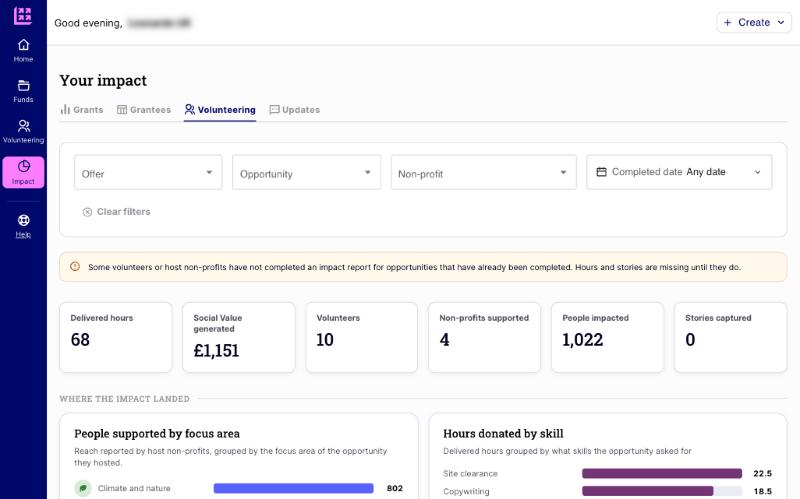
The volunteering impact report shows what your employees’ volunteering achieved: hours, social value, the non-profits supported, and what volunteers and non-profits said afterwards.
Go to Impact in the side navigation and select the Volunteering tab. Use the filters to report on one offer, opportunity, non-profit or period.
What counts
- Hours count once the work is complete: for a date, once the volunteer is marked as attended; for an assignment, once it’s marked complete. Hours logged on an assignment still under way aren’t included yet.
- Social value is worked out from those hours using National TOMs rates. See How we calculate social value for volunteering.
- Once a piece of work is valued, its value doesn’t change.
- Survey figures come from the impact surveys volunteers and host non-profits complete afterwards. If some are missing, a notice at the top says so, and their hours and stories are added when they reply.
Get the detail
- Every answer is under All survey responses at the bottom of the report, in separate tables for volunteers and non-profits.
- The volunteer table shows the measure and replacement value for each piece of work. Click Export CSV to download it.
Get more from your report
- Remind employees to complete their surveys. The response rate is on the report, and missing surveys leave gaps.
- Encourage volunteers to share an update with photos or a short story. These count as stories captured and bring your report to life.
Related: Manage participation, One-off and assignment volunteering opportunities.