If you run the same fund year on year, you don’t need to start from scratch each time. Copying a previous fund pulls in all your existing criteria and settings, so all you need to do is update your timelines and anything else that’s changed.
How to copy a previous fund
- Select Create fund in the top right corner of your dashboard
- Under the Fund criteria section, select Copy from previous fund
- Choose the fund you want to copy from
- Review your settings and update anything that has changed – dates, budget, or eligibility criteria
- Submit for approval when you are ready
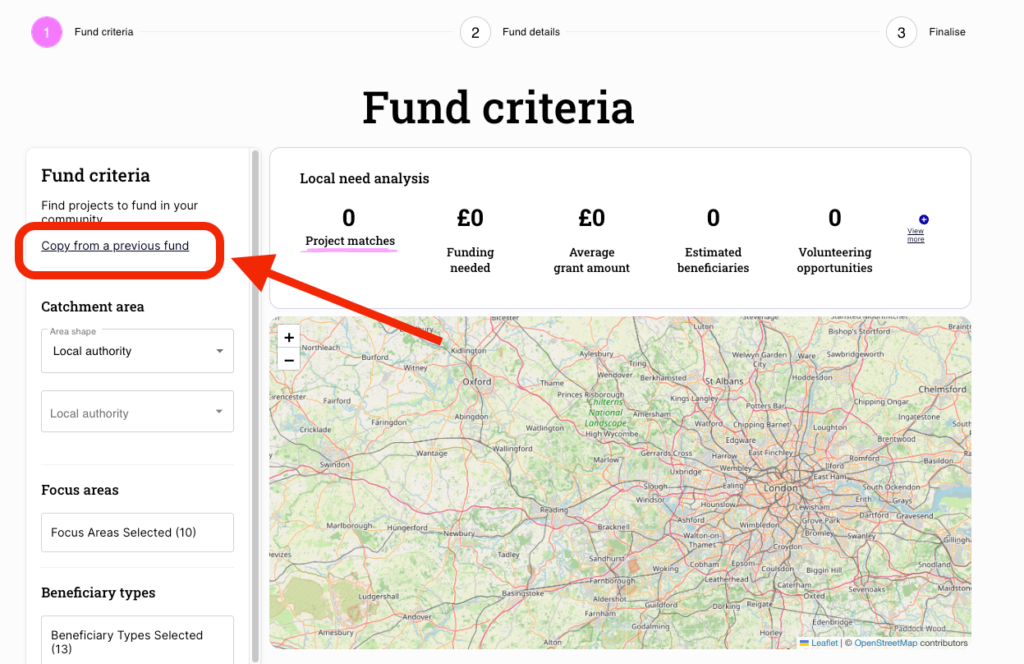
What gets copied
Everything from your original fund is carried across – your fund criteria and description. Only the timelines need updating as a minimum, though we’d recommend reviewing all settings before you submit for approval.
Why it’s useful
Recreating a fund manually takes time. If your annual fund has the same focus, location, and criteria each year, copying saves you from repeating that work. It also reduces the risk of inconsistencies between years.
Need help?
If you have any questions, get in touch at customersuccess@actionfunder.org.