How to check the status of your application
Once you’ve applied to a fund, you’ll want to keep an eye on how things are progressing. Here’s how to find the status of any application, whether it’s still live or already decided.
Step 1: Go to your project management page
From your dashboard, find your project and click ‘manage’ next to its name. This takes you to your project management page, where all your funding activity for that project lives.
Step 2: Check the ‘Funding Applications’ tab
If your project has a live application that’s still awaiting a decision, you’ll find it listed under the Funding Applications tab. This means the funder hasn’t made a decision yet, so there’s nothing more for you to do but wait.
Step 3: Check the ‘Application History’ tab
Can’t see the fund you’re looking for in Funding Applications? Head to the Application History tab instead.
This tab shows every application your project has made, including ones that are no longer active. For each one, you’ll see a clear status and a short explanation of what happened, such as:
- Not selected — the funder reviewed your project but chose not to fund it this time
- No longer eligible — your project or the fund’s criteria changed, so it’s no longer a match
- Withdrawn — you withdrew this application yourself
- Offer declined — you were offered funding but chose not to accept it
- Offer expired — a funding offer was made but expired before it was accepted
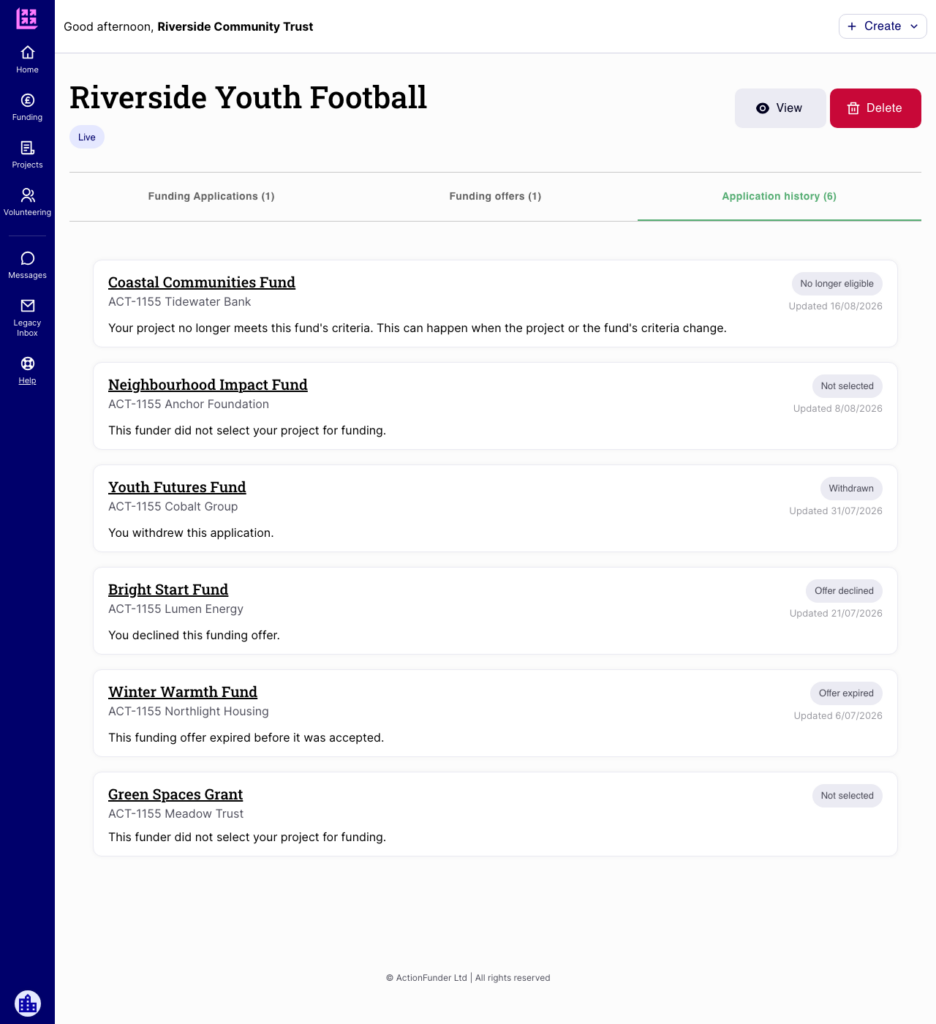
Caption: The Application History tab shows every past application, its status, and the date it was last updated.
Each entry also shows the fund name, the funder, and the date it was last updated, so you can see your full application journey at a glance.
📌 Tip: If a fund appears in your Application History with a status you don’t understand, or you think there’s been a mistake, get in touch with our team and we’ll take a look.
Need help?
If you have any questions, just get in touch — hello@actionfunder.org