Funding decisions are better when more people have a say. The voting tool makes it easy to share a shortlist of projects with stakeholders, collect structured input, and track results in real-time – turning consultation from a tick-box exercise into genuine decision-making power.
What is the voting tool?
The voting tool lets you invite colleagues, community members, or local decision-makers to review and vote on a shortlist of matched projects. Each voter accesses the same clean, mobile-friendly interface via a shared link – no account needed.
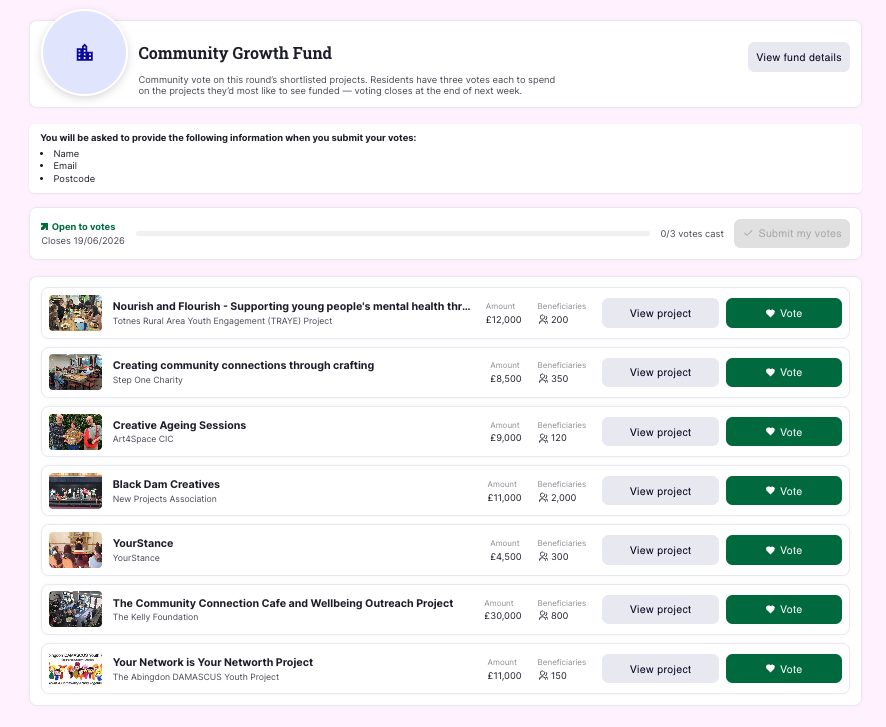
Use it to bring transparency and confidence to your funding decisions, backed by real stakeholder input. Here’s an example of what it looks like from the voters perspective:
When to use it
The voting tool works well when:
- You want a group of people to help evaluate or rank project applications
- You’re running a community or participatory fund
- You need a simple, structured way to gather input before making final decisions
How to set it up
- Build your shortlist – from your fund management page, move the projects you want voters to review into your shortlist
- Enable voting – click ‘Enable voting on shortlist’ and configure your settings (see options below)
- Share the link – copy your unique voting link and share it with participants; they’ll be guided through each project and prompted to submit their vote
Voting options
When setting up a round of voting, you have several controls:
Rating or single-choice: Choose how voters respond. Star ratings (1-5) let voters score every project on your shortlist – great for panels! Single-choice asks voters to pick their favourite(s). We usually recommend voters get a choice of 1 -3.
Scheduled start date: Set a future date for voting to open. Useful if you want to prepare everything in advance and launch at the right moment. This is great for comms teams who want to get ready ahead of time by sharing the link in an email or social post.
Voter data capture: Decide whether to collect information about voters when they submit. Turn this on if you need a record of who participated. Privacy policy terms and conditions are built into the process meaning you can be reassured about data protection.
Results download: Export your voting data directly from the dashboard once voting closes – ready for reports, further analysis or auditing.
Tracking results
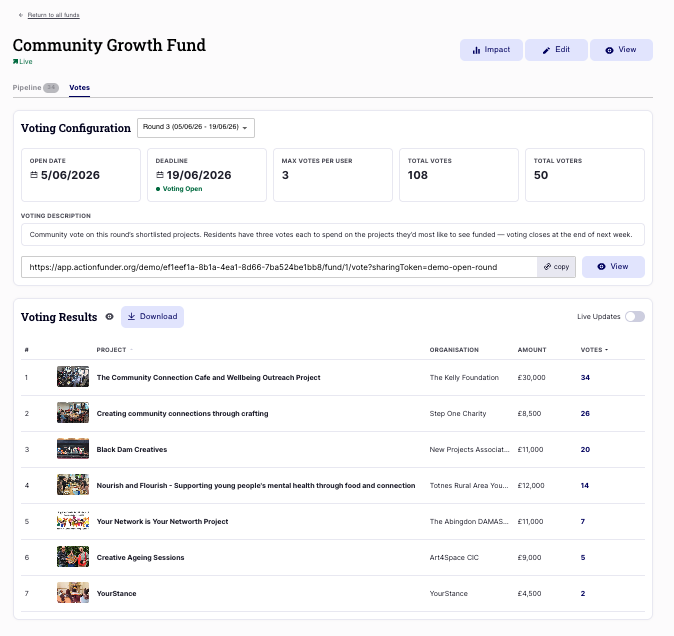
As votes come in, you can follow along in real-time from your dashboard. The results view is clean and distraction-free, designed for sharing on a screen during a meeting or community event.
When you’re ready to close voting and make your decisions, download a full export of the results from your dashboard. Here’s an example of what the dashboard looks like:
Need help?
Get in touch at customersuccess@actionfunder.org