Managing a busy matchlist means a lot of decisions. Tagging projects, shortlisting your favourites, declining those that aren’t the right fit. Done one by one, it takes time you don’t always have. Bulk actions let you move through your matchlist faster, doing more in a single click.
What are bulk actions?
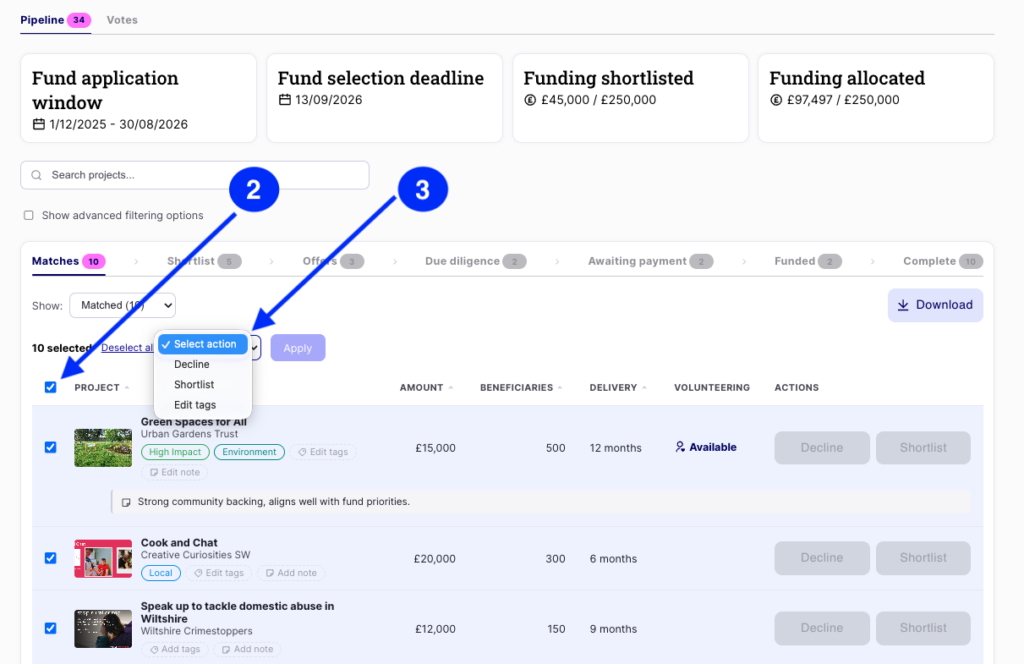
From your fund management page, you can select multiple projects from your matchlist and act on them all at once. No more scrolling back and forth or repetitive clicking.
The available bulk actions are:
- Shortlist – move multiple projects into your shortlist in one go
- Decline – let applicants know they haven’t been successful, without having to open each one individually
- Tag – apply a tag across a group of projects at once to keep your matchlist organised
How to use bulk actions
- Go to your fund management page and open your matchlist
- Select the projects you want to act on using the checkboxes
- Choose your action from the bulk actions menu
- Confirm – and you’re done
Why we built it
As more projects match to your fund, keeping your matchlist organised was becoming a task in itself. Funders told us they were spending valuable time on admin when they’d rather be focused on finding and funding the right projects. Bulk actions puts that time back in your hands.
What this means for you
- Move faster through your matchlist
- Organise and shortlist projects in seconds
- Keep your matchlist clean and up to date
- Spend more time on the decisions that matter
Need help?
If you have any questions, get in touch at customersuccess@actionfunder.org.